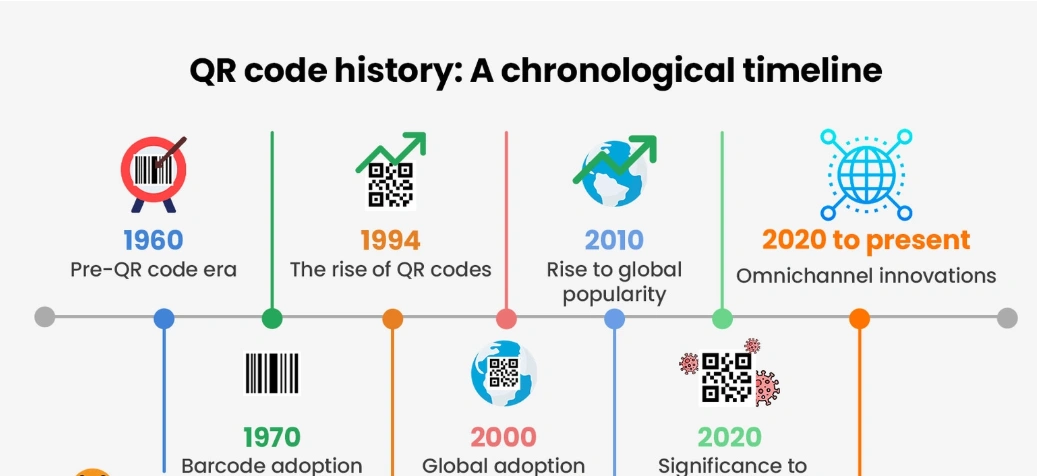
The History and Evolution of QR Codes
The History and Evolution of QR Codes | QR codes have become a familiar part of everyday life. They appear on product packaging, restaurant menus, advertisements, event tickets, payment systems, business cards, and even museum displays. With a simple scan using a smartphone, users can open a website, access information, make a payment, or perform other digital actions.
But QR codes were not originally designed for smartphones or marketing. Their history began in Japan in the 1990s, when engineers developed a faster way to track components during automobile manufacturing.
The story of QR codes is a fascinating example of how a technology created for a specific industrial problem eventually became a global digital tool.
What Is a QR Code?
QR stands for Quick Response. A QR code is a two-dimensional barcode that can store information in a pattern of black and white modules.
Unlike traditional one-dimensional barcodes, which generally store information horizontally, QR codes can store data both horizontally and vertically. This allows them to contain considerably more information within a relatively small area.
A QR code can contain information such as:
- Website addresses
- Text
- Contact information
- Wi-Fi credentials
- Product information
- Payment details
- Event information
- Digital tickets
The code is designed to be scanned and interpreted by a compatible device or application.
The Birth of QR Codes in Japan
The history of QR codes began in 1994, when DENSO WAVE developed the technology in Japan.
The project was led by engineer Masahiro Hara and his team. Their objective was practical: automobile manufacturing required a system capable of tracking many different components quickly and accurately.
Traditional barcodes had limitations because they could store only a relatively small amount of information. Workers sometimes needed to scan multiple barcodes to identify a single item.
The development team looked for a more efficient solution.
The result was the QR code.
DENSO WAVE’s official history states that the first QR code was developed in 1994 to improve the management of automotive parts during manufacturing.
Why Was the QR Code Different?
The biggest innovation was the QR code’s two-dimensional structure.
Traditional barcodes generally consist of a series of vertical lines. QR codes use a square pattern that allows information to be encoded in two dimensions.
This design provided several advantages.
Greater Data Capacity
QR codes could store significantly more information than conventional barcodes.
Faster Scanning
The code could be read quickly, making it suitable for industrial environments where speed mattered.
360-Degree Scanning
The distinctive square positioning patterns help scanners recognize the code’s orientation, allowing it to be scanned from different directions.
Error Correction
QR codes include error-correction capabilities, meaning a code can remain readable even when part of its surface is damaged or obscured.
These characteristics helped QR codes become more versatile than traditional barcodes.
QR Codes Were Initially Free to Use
One of the important decisions in QR code history was DENSO WAVE’s approach to intellectual property.
The company made the QR code specification available for use without requiring licensing fees, although it retained certain rights and trademarks.
This openness helped encourage adoption across different industries.
Instead of remaining a proprietary technology used only by one manufacturer, QR codes could be incorporated into a wide variety of products and systems.
That decision became an important factor in the technology’s eventual global expansion.
From Factories to Everyday Life
For years, QR codes were primarily associated with industrial applications in Japan.
Their use gradually expanded into logistics, inventory management, manufacturing, retail, and other commercial environments.
However, QR codes did not immediately become a global consumer phenomenon.
One major limitation was the need for suitable scanning hardware or software.
As mobile phones became more advanced, this began to change.
The Smartphone Revolution
The rise of smartphones transformed the potential of QR codes.
Modern smartphones included cameras capable of capturing QR codes, while software could interpret the encoded information.
This created a simple interaction:
Point the camera → Scan the code → Access digital information
Users no longer needed specialized industrial scanners.
This dramatically expanded the possible applications of QR technology.
Companies could place QR codes on posters, packaging, brochures, receipts, menus, and advertisements and connect physical objects to digital content.
QR Codes and Marketing
Marketers quickly recognized the potential of QR codes as a bridge between offline and online experiences.
A printed advertisement could contain a QR code that directed customers to a website.
A product package could link to instructions or additional information.
A restaurant menu could connect customers to a digital ordering system.
A business card could contain contact information that customers could save directly to their phones.
The technology effectively turned a static physical surface into an interactive gateway.
The Rise of QR Code Payments
One of the most significant developments in QR code technology has been its use in digital payments.
Instead of entering account details manually, customers can scan a QR code to initiate a payment transaction.
This approach became particularly influential in markets where mobile payments expanded rapidly.
QR-based payment systems can be used by large businesses, small retailers, restaurants, street vendors, and service providers.
The simplicity of displaying a code makes the technology accessible even to businesses that may not have sophisticated payment infrastructure.
QR Codes During the COVID-19 Pandemic
QR codes experienced another major increase in visibility during the COVID-19 pandemic.
Businesses and public institutions used QR codes for a variety of contactless interactions, including:
- Digital menus
- Check-in systems
- Health-related information
- Contactless payments
- Registration forms
- Digital certificates
- Information pages
The pandemic accelerated consumer familiarity with scanning QR codes.
People who had previously viewed QR codes as an occasional marketing tool began using them as part of everyday transactions and services.
QR Codes in Modern Retail
Today, QR codes can be found throughout the retail environment.
They can connect physical products to digital information such as:
- Product specifications
- User manuals
- Authentication pages
- Promotions
- Loyalty programs
- Reviews
- Videos
- Customer support
This creates a more flexible shopping experience.
Instead of printing every piece of information directly on packaging, businesses can use QR codes to provide customers with additional digital resources.
QR Codes in Events and Travel
QR technology has also changed how people access events and travel services.
Digital tickets can contain QR codes that are scanned at entrances. Airlines, transportation companies, entertainment venues, and conference organizers can use similar systems to verify access.
The benefit is convenience.
Instead of printing a physical ticket, a customer can keep the QR code on a smartphone.
This reduces paper use while making ticket verification fast and easy.
How QR Codes Have Evolved
The basic visual concept of the QR code has remained remarkably consistent, but its applications have changed dramatically.
Its evolution can be viewed in several stages:
1994: Developed for tracking automotive components.
Late 1990s–2000s: Expanded into logistics, manufacturing, and commercial applications.
2000s: Mobile phones increasingly gained QR scanning capabilities.
2010s: QR codes became more common in marketing, retail, and mobile services.
2020–2021: Contactless applications during the pandemic accelerated widespread consumer adoption.
Today: QR codes are used for payments, authentication, information sharing, ticketing, marketing, connectivity, and many other digital interactions.
The technology evolved not because the fundamental code changed dramatically, but because the surrounding digital ecosystem became capable of using it more effectively.
Why QR Codes Remain Relevant
Despite being more than three decades old, QR codes remain highly useful.
One reason is their simplicity.
Users do not need to type a long website address or manually enter complicated information. A scan can perform the connection almost instantly.
QR codes also work across many physical environments. They can be printed on paper, displayed on screens, attached to products, or incorporated into signs.
Their low cost and flexibility make them attractive to businesses and organizations of different sizes.
The Future of QR Codes
The future of QR codes is likely to involve deeper integration with digital services.
They may continue to play an important role in:
- Digital payments
- Product authentication
- Smart packaging
- Customer engagement
- Identity and access systems
- Connected devices
- Retail experiences
- Digital tickets
QR codes may also become less noticeable as they become integrated into broader technologies.
The important point is that QR codes provide a simple bridge between the physical and digital worlds.
The history and evolution of QR codes demonstrates how a technology can move far beyond its original purpose.
Created in Japan in 1994 to solve an automotive manufacturing problem, QR codes eventually became a global method for connecting physical objects with digital information. Their success was driven by high data capacity, fast scanning, error correction, open availability, and—most importantly—the growth of smartphones.
Today, QR codes are no longer limited to factories or specialized scanners. They are part of everyday experiences, from restaurant menus and payments to event tickets and product information.
What began as a solution for tracking automobile parts has become one of the world’s most recognizable tools for connecting the physical and digital worlds.
Unlocking the Secret Architecture Behind QR Code Pixels
Unlocking the Secret Architecture Behind QR Code Pixels | A tiny black-and-white square is now a permanent fixture on restaurant tables, product packaging, and digital event tickets. We know it simply as a QR (Quick Response) code. With a quick point of a smartphone camera, a webpage or digital menu instantly loads. Yet, behind this effortless convenience lies a highly precise two-dimensional matrix system that translates visual patterns into binary data (1s and 0s).
At first glance, the pixels look randomly scattered. However, closer inspection reveals a highly organized architectural map. Every single component within that grid plays a crucial role in ensuring the scanning process works flawlessly. Let’s break down the hidden anatomy that powers this universal scanning technology.
Mapping the Core Anatomy of a QR Code
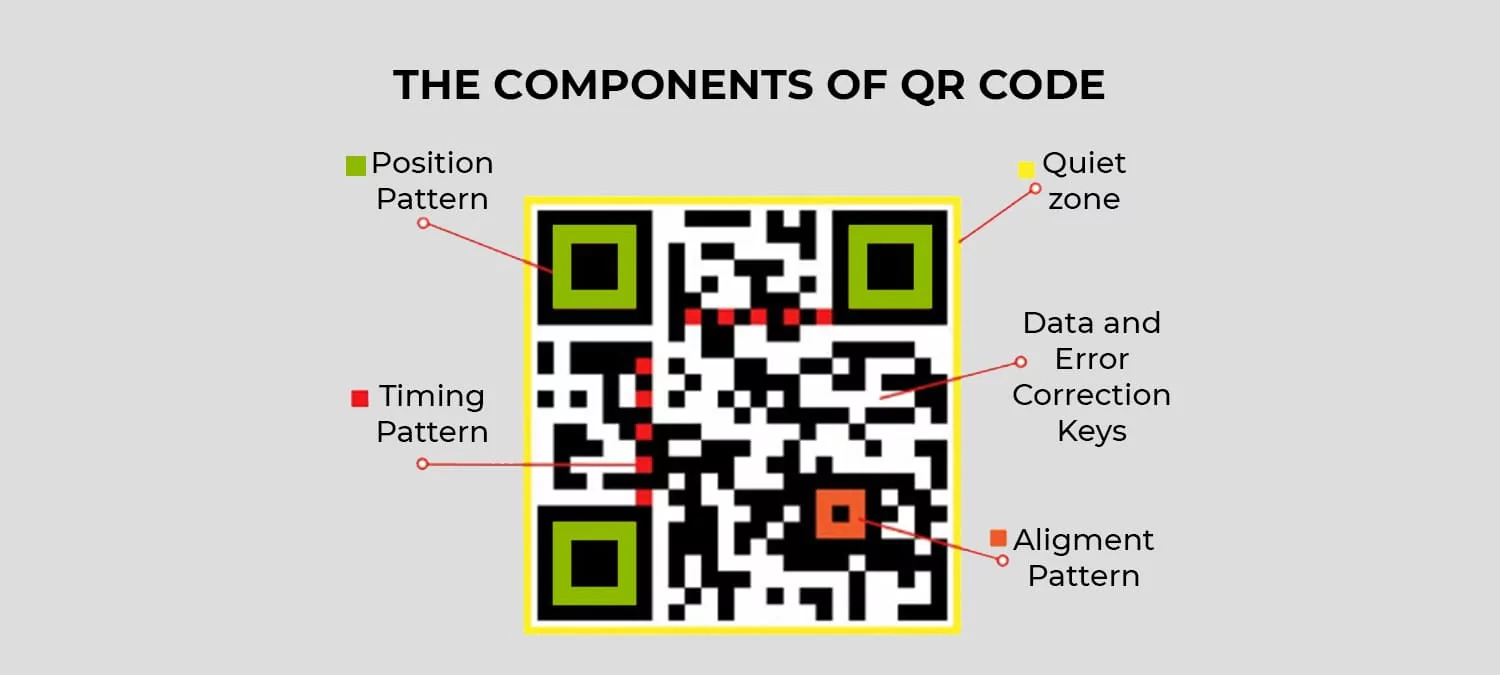
To understand how a scanner reads visual data in milliseconds, we need to look at its structural building blocks:
-
Quiet Zone: This is the blank white border that frames the entire exterior of the QR code. Its role is vital: it tells the camera sensor exactly where the code begins and ends, separating the data from surrounding text or graphic noise.
-
Finder Patterns: The three large squares positioned in the top-left, top-right, and bottom-left corners. These markers help the camera locate the QR code instantly and determine its orientation. Thanks to these patterns, you can scan a code even if your phone is tilted or upside down.
-
Alignment Patterns: Smaller squares usually located near the bottom-right area. Their job is to correct visual distortion. If a QR code is printed on a curved surface—like a bottle or a folded t-shirt—these patterns help the scanner realign the image to ensure it remains readable.
-
Timing Patterns: If you look closely, there are alternating black-and-white dashed lines connecting the three large finder patterns. This component acts as a built-in internal ruler, telling the scanning system exactly how large the data grid is.
-
Format & Version Information: Positioned near the finder squares, these zones store technical data regarding the error correction level and the specific matrix layout. Standard QR code sizes vary greatly, ranging from a compact $21 \times 21$ modules up to a dense $177 \times 177$ modules.
The Data Area and Logo Integration
The remaining small squares (known as modules) filling the center of the QR code are where the actual information lives. This is where URLs, text, or payment credentials are stored as binary code.
Fascinatingly, this data area is more than just raw information. It integrates an advanced technology called Reed-Solomon Error Correction. This data redundancy acts as a built-in safety net. If a QR code gets scratched, smudged, or intentionally covered by a company logo in the center, the code does not break.
The error correction system can recover lost data even if up to 30% of the QR code’s surface is obscured or damaged. This flexibility allows graphic designers and marketing teams to insert brand icons directly into the center without sacrificing scannability.
Why This Structure Matters to Users
The mathematical precision behind a QR code’s anatomy delivers a massive impact on daily user experience. First, it cuts out the friction of manual typing, granting instant access. Second, its high scanning success rate eliminates frustration under poor lighting or awkward angles.
By combining quiet zones, directional guides, and smart data recovery, a technology originally built to track automotive parts has successfully become the most efficient bridge connecting our physical world to the digital space.