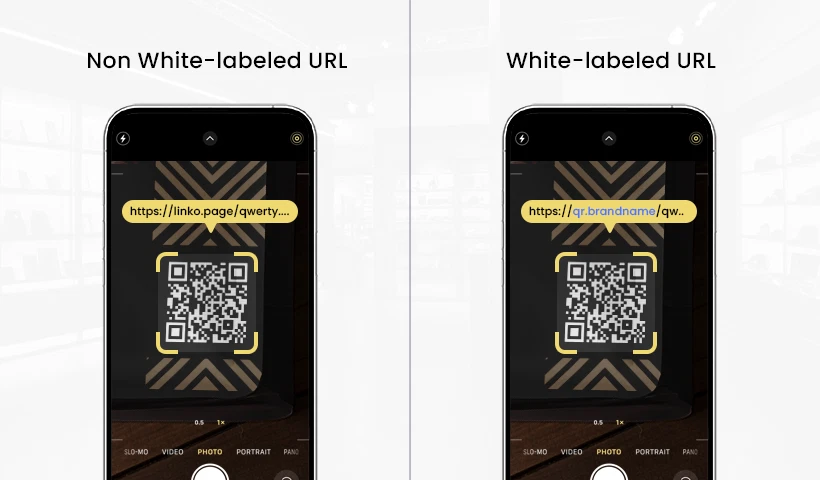
Why Your Business Needs Custom QR Code URLs
Why Your Business Needs Custom QR Code URLs | Black-and-white pixelated squares affixed to product packaging, restaurant tables, and roadside billboards have become a ubiquitous sight. The presence of QR codes has seamlessly bridged the gap between the physical and digital worlds in a matter of seconds. Yet, behind this ultimate convenience lies a burgeoning security loophole that makes modern consumers increasingly hesitant before pointing their smartphone cameras at those pixelated boxes.
When a customer scans a code, the very first thing that appears on their screen is the URL preview. This is the ultimate tipping point. If the emerging link consists of a random string of characters or points to an unfamiliar third-party domain, doubt instantly creeps into their minds: “Is this safe?” or “Am I being lured into a hacker’s trap?”
This fear is well-founded. Cyber threats exploiting QR codes, a phenomenon known as “quishing” (QR code phishing), are steadily on the rise. To combat this crisis of confidence, forward-thinking business owners are shifting toward branded short links or custom domains embedded directly within their dynamic QR codes. This step is far from a mere aesthetic choice; it is a fundamental strategy to establish a fortress of trust and protect brand reputation in the eyes of the consumer.
Understanding the Quishing Threat and Generic Code Vulnerabilities
To fully grasp why URL customization is crucial, it helps to examine how modern cybercriminals operate. In conventional phishing schemes, scammers distribute fraudulent links through emails or text messages. With quishing, however, they exploit the physical nature of the QR code itself. Fraudsters frequently print counterfeit QR code stickers and overlay them directly on top of legitimate codes found in shops, restaurants, or public venues.
When unsuspecting users scan these tampered codes, they are redirected to spoofed websites designed to harvest personal data, steal credit card credentials, or even deploy malicious software onto their mobile devices.
The greatest vulnerability of relying on free or standard out-of-the-box QR code generators is their usage of shared, generic domains. Because these standard domains are public, anyone can use them—including bad actors. Consequently, when everyday users see a generic link preview, they have no reliable way to verify whether that code truly belongs to your company or an underlying scammer. This is precisely where a white-label URL serves as a concrete differentiator.
Core Reasons Businesses Must Customize QR Code URLs
Implementing a dedicated domain within your dynamic QR code infrastructure provides layered security and operational benefits for both your enterprise and your client base. Here is why this transition is essential:
1. Establishing Immediate Peace of Mind
The first reflex of modern smartphone users when scanning a QR code is to glance at the preview text before tapping through. This crucial interaction, which unfolds in a fraction of a second, dictates their next move.
If your business utilizes a dedicated domain that mirrors your official website and corporate identity, users instantly recognize the source. This immediate recognition puts consumers at ease. They know exactly where they are heading and who operates the destination page, allowing the digital interaction to proceed without friction or anxiety.
2. Breaking the Chain of Digital Fraud
A white-label URL system operates as a legitimate digital signature for every piece of material you deploy into the public square. Because this custom domain is officially registered under your company’s name, outside parties cannot manipulate it or create exact replicas without unauthorized access to your servers.
This heavily restricts the operational playground for quishing perpetrators. Even if a bad actor manages to paste a physical sticker over your brochures, observant customers will immediately notice a mismatch if the URL preview displayed on their screen does not match the official custom domain they expect from your brand.
3. Significantly Driving Up Scan Engagement
Consumer skepticism is the number one enemy of a successful digital campaign. When people feel apprehensive about a link, they choose to walk away. Conversely, familiarity breeds engagement.
Studies in consumer behavior consistently show a positive correlation between clear link identity and user interaction. Promotional campaigns that integrate corporate logos into the physical design of the QR code and pair them with customized URLs can boost scan-through rates by up to 34% compared to plain, mysterious codes. Consumers are far more willing to scan asset materials that look cohesive, professional, and trustworthy.
4. Shielding Digital Infrastructure from Mass Blacklisting
A hidden risk that many business owners overlook when utilizing free QR code utilities is the reliance on a shared neighborhood domain. No-cost generator platforms host thousands of random users under a single domain umbrella.
If another user abuses that same platform to distribute spam, malicious files, or fraudulent content, cyber security systems and third-party antivirus software will flag and blacklist the entire main domain. The fallout for your business is catastrophic. Even though you are using your code completely honestly and legally, your QR codes will suddenly break and become inaccessible to your customers because mobile security systems deem the root domain unsafe. By possessing a custom domain, you completely insulate your brand from neighbor-induced risks and retain absolute sovereignty over your digital reputation.
Tactical Steps to Implement Custom Domains in Dynamic QR Codes
Migrating standard URLs to branded short links is straightforward. Most enterprise-grade QR code generation platforms provide white-label or custom domain features directly within their service tiers.
The process typically begins by pointing a designated corporate domain or an official company link extension toward the servers of your QR code provider. From there, you simply add a CNAME record within your Domain Name System (DNS) management panel to establish the secure connection.
Once this technical integration is complete, any new dynamic QR code generated for restaurant menus, real estate flyers, or event ticketing will automatically output short links carrying your unique brand name. A major added benefit of the dynamic format is that you retain the flexibility to change the destination path at any given moment without ever needing to reprint the physical QR codes already distributed to the public.
Conclusion
Consumer trust is the most valuable commodity in the modern digital marketplace, and it is easily shaken by emerging cyber security challenges. Relying on generic, out-of-the-box QR code links is equivalent to leaving your business doors wide open to consumer doubt and external tampering.
Investing in branded short links for dynamic QR codes is no longer an optional luxury for marketing departments; it is an essential safety protocol. By synchronizing your physical brand presence with transparent, identifiable URLs, you protect your loyal customers from quishing traps while simultaneously maximizing the performance of your offline-to-online campaigns. In an era where digital noise and uncertainty are rampant, structural clarity remains the ultimate key to winning over the consumer.
How Damaged QR Codes Stay Scannable
How Damaged QR Codes Stay Scannable | Imagine a traditional barcode on a supermarket food package that gets slightly scratched by a box cutter. The result? The cashier has to manually type in the serial number because the scanner fails to read the data. However, this scenario almost never happens with a QR code. You might often see these unique square codes pasted on street utility poles, torn, covered in mud splatters, or even deliberately vandalized, yet amazingly, your phone can still detect them in the blink of an eye.
This extraordinary survival capability is neither a coincidence nor technological magic. Behind that combination of random pixels lies a highly ingenious mathematical defense system called Error Correction Coding (ECC). This feature is the unsung hero, ensuring the information inside the square is accurately delivered even when its physical form is badly damaged.
For business owners, designers, and everyday users alike, understanding how this internal architecture works will change the way we view this simple technology that we use every single day.
The 4 Levels of Resilience: Measuring the Limits of QR Code Damage
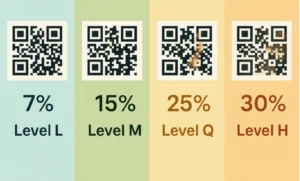
Every time a QR code is created through a generator, the system automatically embeds a specific damage tolerance level. This flexibility is divided into four standard levels, each determining how much of the code’s visual pattern can be lost without breaking its functionality.
Level L (Low)
At this tier, the code is designed with high space efficiency but offers the lowest defense. The system can only recover lost or damaged data up to 7%. Level L is typically used on digital mediums such as monitor screens or high-specification PDF documents, where physical risks like tearing or scratching are virtually nonexistent.
Level M (Medium)
This is the standard default setting most commonly encountered in daily life. With the ability to recover up to 15% of damaged data, Level M offers a perfect balance between the density of the square pattern and durability. This type of code is ideal for brochures, business cards, or restaurant menus kept indoors.
Level Q (Quartile)
When a code needs to be printed on surfaces that are frequently touched or placed in semi-outdoor environments, Level Q is a wise choice. This tier can reconstruct missing information up to 25%. The logistics and supply chain industries frequently utilize this level because shipping packages are prone to friction during warehouse distribution.
Level H (High)
This is the highest tier in terms of visual data protection, where the code remains scannable even if its physical appearance is ruined or missing up to 30%. Level H serves as the primary shield for extreme use in outdoor environments exposed to harsh weather, rain, or rough abrasions on heavy industrial product packaging.
However, a technological trade-off applies here. The higher the error correction level you choose (such as Level H), the denser and more complex the arrangement of tiny pixel squares inside it becomes. This happens because the system requires extra space to store the redundant backup data. Consequently, the physical print size must be adjusted so that older phone cameras do not struggle to capture the highly compact pixel details.
The Ingenious Mechanism Behind Data Recovery
How is it possible for a static image to program itself to “heal” when read by a camera? The secret lies in two main pillars embedded within the code’s system: information redundancy techniques and advanced mathematical algorithms.
The Data Redundancy System
The fundamental principle behind this resilience is actually quite simple: replication. When data is written into a QR code, the information is not just written once in one place. The system breaks that data down and writes it repeatedly across different areas of the grid.
To use an analogy, it is as if you made multiple copies of an important document and scattered them across several different desk drawers. If the top-right drawer is destroyed by an impact, the computer or scanning application on your phone will not panic. It simply checks the bottom-left or center drawers to retrieve the exact same pieces of information. As long as these backup sections remain intact, the original information can still be reassembled perfectly.
The Magic of the Reed-Solomon Algorithm
While the redundancy technique is responsible for providing backup copies, the Reed-Solomon Algorithm is the brain that works to piece those fragments back together. This advanced mathematical algorithm was originally developed for satellite communications and digital disc storage (CDs/DVDs) to prevent audio and video from skipping when a disc got scratched.
When your phone camera targets a damaged black-and-white square, this algorithm acts like a detective solving a crossword puzzle. It analyzes the remaining surviving pixels, calculates the mathematical probabilities, and instantly “fills in the blanks” for the missing parts.
This intricate process is very similar to how the human brain reads a sentence with missing letters. When you see the text “G-o-d M-r-n-n-g”, your brain automatically knows the phrase is “Good Morning”. The algorithm does the exact same thing for computer code in a fraction of a second.
A Creative Touch: Utilizing Damage Tolerance for Aesthetics
The fascinating aspect of this damage tolerance feature has given birth to a new trend in digital marketing and graphic design: visual customization. Because scanning systems can tolerate data loss up to 30%, designers purposely exploit this “official damage window” to insert aesthetic elements.
This is exactly where corporate logos, social media icons, or mini illustrations can be placed right in the center of the square without breaking its original scanning functionality. Modern generators treat the logo in the center as a form of artificial “damage” covering the primary pixels.
Automatically, thanks to the heavy lifting of Level Q or Level H, the system shifts and strengthens the data covered by the logo to the outer edges of the grid. The end result is an interactive marketing tool that looks highly professional, branded, yet remains incredibly responsive when scanned by consumers.
Practical Guide to Choosing the Right Encoding Level
Choosing the right error correction level is not just a matter of picking the highest percentage. Improper usage can actually make your code too dense and difficult to read for older phone models whose cameras lack advanced sensors. Here is a practical guide based on real-world conditions:
-
Outdoor Media (Billboards, Banners, Street Posters): It is highly recommended to use Level H. Weather factors, direct sunlight fading the ink, and the risk of vandalism demand maximum protection so your promotional investment does not go to waste.
-
Wholesale Product Packaging and Logistics: Opt for Level Q or Level M. Cardboard boxes stacked inside delivery trucks are highly prone to heavy friction that can scrape off the outer printed layer.
-
Business Branding Needs (Logo Customization): Always select Level H or at least Level Q. Inserting a visual identity in the center requires a large data compensation space so that the remaining pixels around the logo still carry valid link instructions.
-
Administrative and Digital Needs (E-Tickets, Presentation Screens): Simply use Level L. Using a lower level keeps the square pattern simple, clean, minimalist, and exceptionally fast to load on any type of digital screen.
This technology proves that the efficiency of a system is measured not only by how fast it works under normal conditions, but by how resiliently it endures and recovers when real-world situations are far from perfect. Through a solid foundation of mathematics, this humble square will continue to be a reliable bridge of information across various industries.
What Is Quishing? Understanding the New QR Code Scam
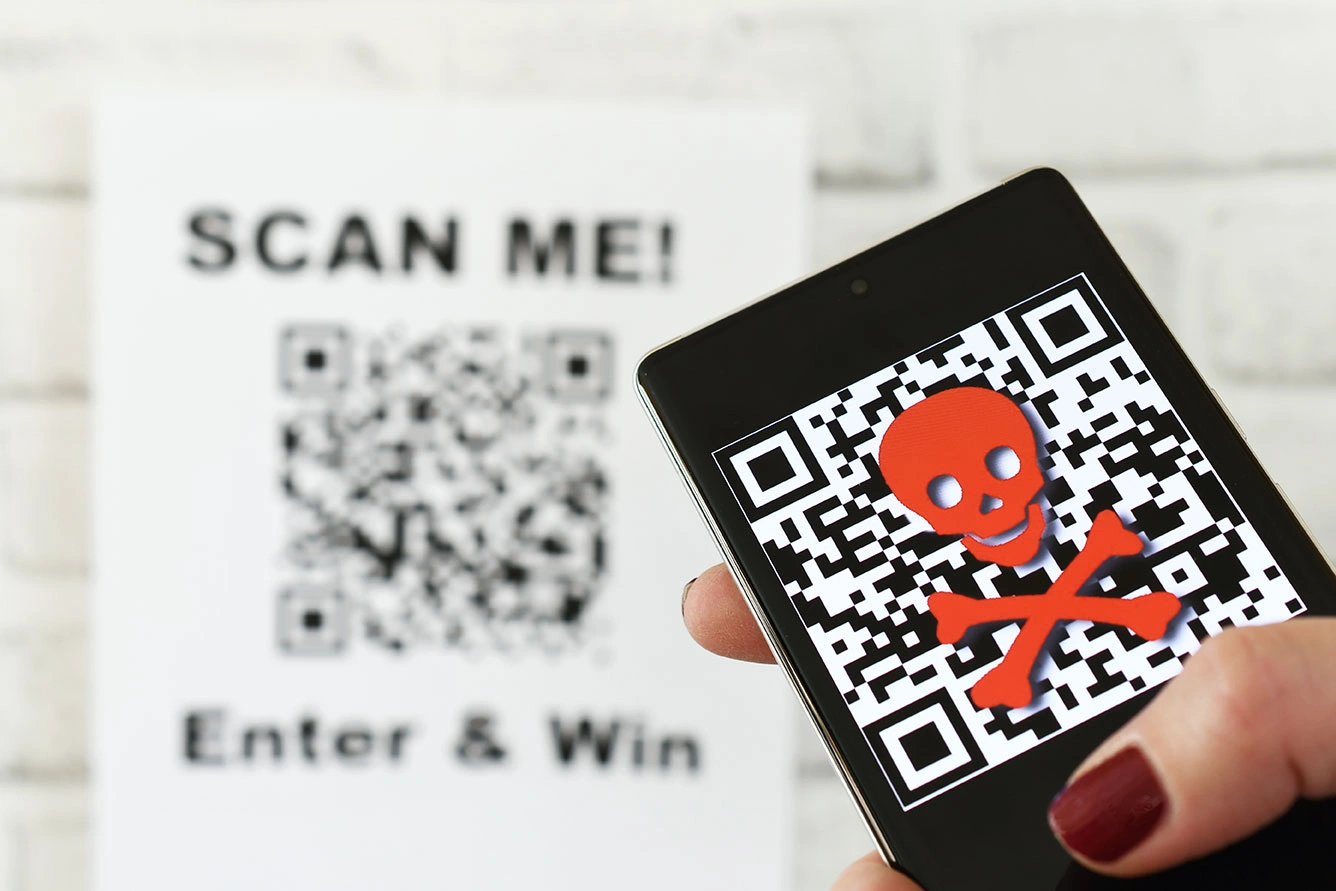
What Is Quishing? Understanding the New QR Code Scam | Imagine this scenario: you are in a rush to park your car in a crowded downtown area. Near the payment machine, a QR code is prominently displayed with clear instructions to scan for faster payment. Without any suspicion, you point your phone’s camera, tap the link that appears, and input your credit card details. A few hours later, your phone buzzes with mysterious transaction alerts draining your bank account.
The situation described above is no longer just a sci-fi storyline, but a harsh reality of an increasingly rampant cybercrime method. This phenomenon is known as quishing, a blend of the words QR code and phishing. This fraudulent technique exploits high public trust in the convenience of these little black-and-white squares to steal personal data, financial information, or inject malicious software (malware) directly into your phone’s operating system.
The success of this tactic lies deep within human psychology, which naturally prioritizes speed and convenience. Ever since this technology was mass-adopted for digital restaurant menus, contactless payments, and e-tickets, user vigilance has significantly dropped. Consequently, a small illicit sticker slapped on by a criminal is often all it takes to deceive hundreds of unsuspecting people in a single day.
How QR Code Tampering Happens in Public Spaces
These illegal operations are executed in a highly tactical and often seamless manner. Cybercriminals do not need to hack into complex banking systems to steal your money; they simply exploit the weak spot in physical interactions between humans and technology.
One of the most common methods is replacing physical codes in public facilities. Scammers print fraudulent QR code stickers that look almost identical to the legitimate ones, then paste them directly over the official codes. High-risk locations frequently targeted for these operations include:
-
Restaurant Tables: Swapping digital menu codes to redirect customers to fraudulent payment gateways.
-
Parking Meters: Tricking drivers who want to pay their parking fees quickly.
-
Public Charging Stations: Trapping users looking for quick internet access or complimentary charging services.
Beyond physical tampering, this scam has also expanded into the digital realm via automated text messages (SMS phishing) or emails. You might suddenly receive a message claiming to be from a major shipping company, stating that a package could not be delivered due to an outstanding customs fee. Inside the message, instead of a standard text hyperlink, they embed a QR code image under the guise of system security. In reality, this is just a trick to bypass your email client’s spam filters, which often fail to scan malicious links hidden within images.
Smart Steps to Verify the Legitimacy of a QR Code
Avoiding this digital trap does not mean you have to stop using scanning technology altogether. The key lies in sharpening your awareness and developing a habit of verifying information before taking action. There are several visual and procedural indicators you can use to filter out safe codes from those that potentially collaborate with cybercriminals.
Check for Physical Modifications on Printed Media
Before activating your smartphone camera, take two seconds to look at and feel the surface of the sign or pamphlet displaying the code. If you feel a raised double layer, notice crooked edges, or detect peeling marks around the square, abort your plan to scan it. Legitimate businesses and vendors always print QR codes directly onto the acrylic boards or posters, rather than haphazardly sticking them onto finished materials.
Utilize the Link Preview Feature
Every modern smartphone, whether running on Android or iOS, features a native security system that displays a preview of the website address (URL) right after the camera reads the code. Do not instantly tap or allow the browser window to open automatically if your phone has auto-navigation enabled. Turn off the auto-open feature in your scanner settings so you always have a moment to inspect the URL structure first.
Detect Anomalies in the URL Structure
Cybercriminals frequently register web domains that look incredibly similar to legitimate brands to deceive untrained eyes. This technique is known as typosquatting. Pay close attention to the structural differences below:
-
Official URL:
companyname.com -
Fraudulent URL:
login-update.comorcompany-name-security.net
If the primary domain consists of random words, uses unusual number combinations, or contains overly long and confusing subdomains, it is a definitive red flag that you are being funneled into a digital trap.
Recognize Forced and Urgent Communication Patterns
Social engineering tactics always rely on creating a sense of panic or extreme urgency. Fraudulent messages are usually accompanied by threats such as “Your account will be frozen within 2 hours” or “Late fees will double if you don’t scan now”. Genuine government agencies, banks, and professional service providers will never suddenly use a QR code to force you into making critical financial decisions.
Proactive Strategies to Protect Yourself from Cyber Threats
Awareness alone is insufficient if it is not backed by consistent preventive actions in your daily digital routine. To ensure your sensitive data and digital wallets remain optimally protected, implement the following self-security protocols:
Prioritize Access Through Official Apps
When paying monthly utility bills, parking fees, or ordering food at major franchise outlets, avoid relying on printed QR codes displayed in open public spaces. A much safer alternative is to open the official service provider’s app already installed on your phone, or manually type their official website address into your browser’s search bar. Bypassing third-party physical elements completely cuts down the risk of intervention.
Stay Skeptical of Unsolicited Codes
Never scan a code that comes from an ambiguous or unknown source. Unmarked letters in your physical mailbox promising a free vacation, mysterious prize flyers inside online shopping packages that don’t list the sender, or WhatsApp messages from random foreign numbers must be completely ignored. Turning a blind eye to these messages is the most effective way to break the chain of a cyberattack before it even starts.
Exit Immediately If Prompted for Credentials
A basic QR code meant for a food menu or tourist information should only display text, images, or informative documents. If, after scanning, your phone screen loads a form requesting your username, password, PIN, or debit card details, close that browser tab immediately. Do not fill out any fields, even if the page looks identical to your banking or social media login page.
Fortify Your Device’s Defenses
Layered security is your best bet to minimize damage in case you accidentally make a wrong scan. Ensure Multi-Factor Authentication (MFA or 2FA) is active across all your vital accounts, such as your primary email, banking applications, and digital wallets. With this feature active, even if a scammer manages to harvest your password through an imitation site, they still won’t be able to log in without the secondary verification code sent directly to your phone or authenticator app. Additionally, keep your phone’s operating system updated to patch software vulnerabilities that could be exploited by malicious scripts.
Striking a Balance Between Convenience and Security
Technology is fundamentally created as a tool to simplify civilization, not to become a new source of fear. The presence of these two-dimensional matrix barcodes has contributed massively to accelerating micro-economies and eliminating tedious physical transaction bureaucracies.
Nevertheless, every technological leap is inevitably accompanied by loopholes used by irresponsible parties seeking illegal profits. Being a tech-savvy user does not mean becoming paranoid and rejecting innovation; rather, it means becoming a wise, critical, and careful individual when interacting with the digital ecosystem.
By building the habit of checking the physical condition of codes, inspecting link previews closely, and applying layered authentication to personal devices, you can continue to enjoy the convenience of scanning technology with complete peace of mind. Protect your data proactively, because your personal cyberspace security begins right at your fingertips before tapping that screen.
Unlocking the Secret Architecture Behind QR Code Pixels
Unlocking the Secret Architecture Behind QR Code Pixels | A tiny black-and-white square is now a permanent fixture on restaurant tables, product packaging, and digital event tickets. We know it simply as a QR (Quick Response) code. With a quick point of a smartphone camera, a webpage or digital menu instantly loads. Yet, behind this effortless convenience lies a highly precise two-dimensional matrix system that translates visual patterns into binary data (1s and 0s).
At first glance, the pixels look randomly scattered. However, closer inspection reveals a highly organized architectural map. Every single component within that grid plays a crucial role in ensuring the scanning process works flawlessly. Let’s break down the hidden anatomy that powers this universal scanning technology.
Mapping the Core Anatomy of a QR Code
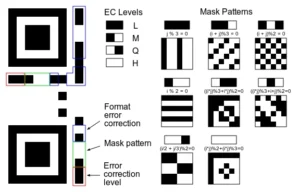
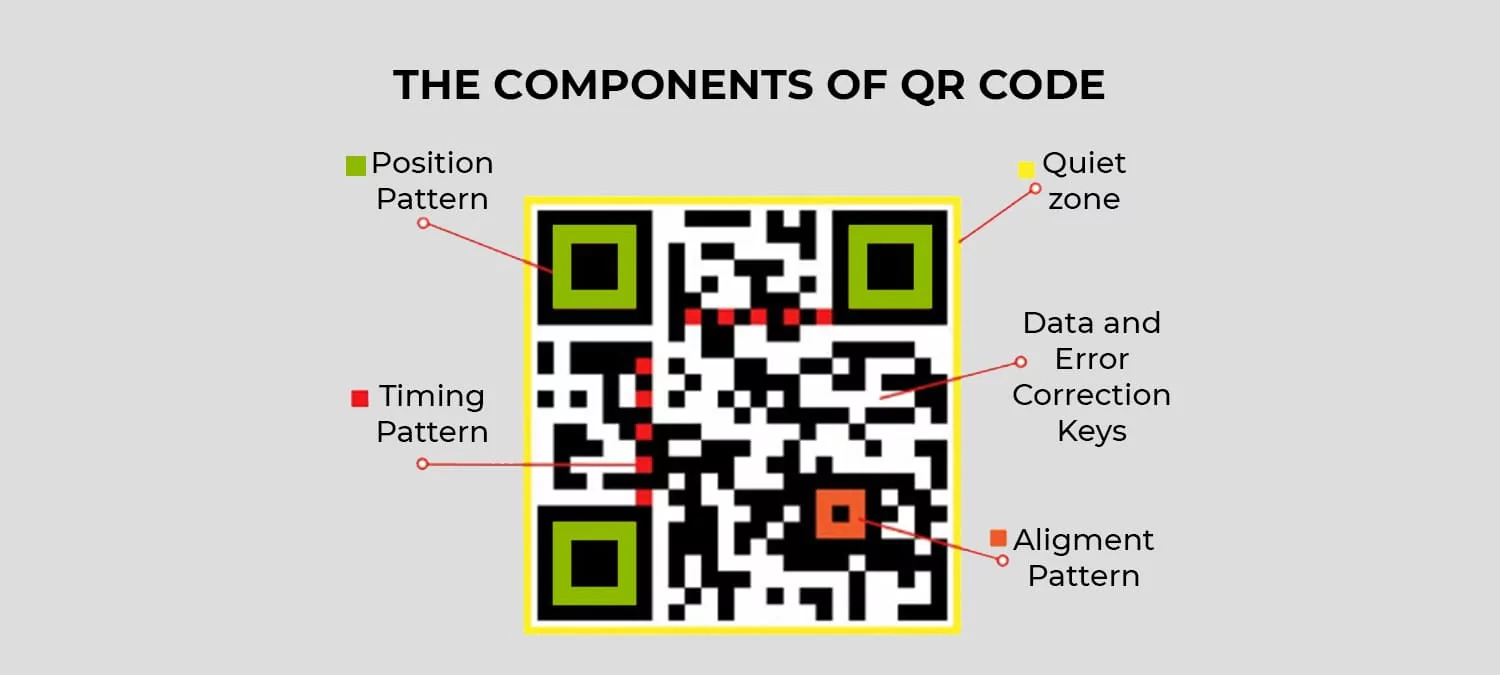
To understand how a scanner reads visual data in milliseconds, we need to look at its structural building blocks:
-
Quiet Zone: This is the blank white border that frames the entire exterior of the QR code. Its role is vital: it tells the camera sensor exactly where the code begins and ends, separating the data from surrounding text or graphic noise.
-
Finder Patterns: The three large squares positioned in the top-left, top-right, and bottom-left corners. These markers help the camera locate the QR code instantly and determine its orientation. Thanks to these patterns, you can scan a code even if your phone is tilted or upside down.
-
Alignment Patterns: Smaller squares usually located near the bottom-right area. Their job is to correct visual distortion. If a QR code is printed on a curved surface—like a bottle or a folded t-shirt—these patterns help the scanner realign the image to ensure it remains readable.
-
Timing Patterns: If you look closely, there are alternating black-and-white dashed lines connecting the three large finder patterns. This component acts as a built-in internal ruler, telling the scanning system exactly how large the data grid is.
-
Format & Version Information: Positioned near the finder squares, these zones store technical data regarding the error correction level and the specific matrix layout. Standard QR code sizes vary greatly, ranging from a compact $21 \times 21$ modules up to a dense $177 \times 177$ modules.
The Data Area and Logo Integration
The remaining small squares (known as modules) filling the center of the QR code are where the actual information lives. This is where URLs, text, or payment credentials are stored as binary code.
Fascinatingly, this data area is more than just raw information. It integrates an advanced technology called Reed-Solomon Error Correction. This data redundancy acts as a built-in safety net. If a QR code gets scratched, smudged, or intentionally covered by a company logo in the center, the code does not break.
The error correction system can recover lost data even if up to 30% of the QR code’s surface is obscured or damaged. This flexibility allows graphic designers and marketing teams to insert brand icons directly into the center without sacrificing scannability.
Why This Structure Matters to Users
The mathematical precision behind a QR code’s anatomy delivers a massive impact on daily user experience. First, it cuts out the friction of manual typing, granting instant access. Second, its high scanning success rate eliminates frustration under poor lighting or awkward angles.
By combining quiet zones, directional guides, and smart data recovery, a technology originally built to track automotive parts has successfully become the most efficient bridge connecting our physical world to the digital space.